Berllina: The Elegant Handwritten Font That Elevates Your Design Projects
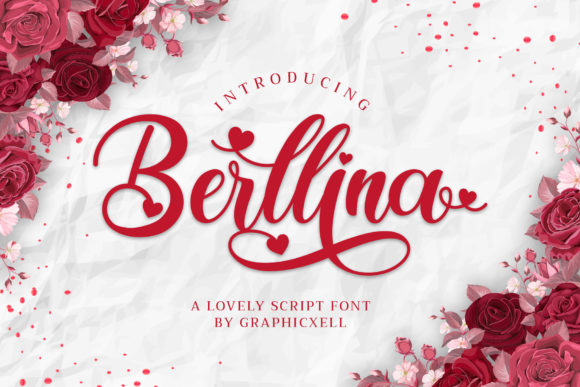
When it comes to typography, the right font can make or break your design. Berllina is a standout in the world of handwritten fonts, offering a unique blend of elegance and modernity. Designed with flowing lines and a varying baseline, this font captures the essence of calligraphy while adapting to contemporary design needs. Whether you're creating branding materials, editorial layouts, or digital content, Berllina brings a touch of sophistication that sets your work apart.
Why Choose Berllina?
Berllina’s appeal lies in its ability to balance traditional calligraphic influences with a fresh, contemporary feel. Its smooth curves and graceful strokes give your text a personal, handcrafted appearance, which is especially useful for logos, invitations, and creative projects that demand a human touch. The font's PUA encoding ensures easy access to all glyphs and swashes, making it a versatile choice for designers who want to experiment without limitations.
What makes Berllina truly special is its attention to detail. From gorgeous glyphs to stunning alternates, every element of the font is crafted to enhance readability and visual appeal. This makes it ideal for both print and digital media, ensuring your message stands out no matter the platform.
Common Mistakes When Using Berllina
While Berllina is a powerful tool, using it incorrectly can lead to less-than-ideal results. Here are some common pitfalls to avoid:
- Ignoring Kerning and Spacing: Handwritten fonts like Berllina require careful spacing to maintain their natural flow. Poorly spaced text can appear cluttered or unprofessional. Always use built-in kerning tools or manually adjust spacing where necessary.
- Overusing Swashes: While Berllina offers beautiful swashes, overusing them can distract from the main message. Use them sparingly for emphasis, such as in headlines or titles, rather than throughout body text.
- Misjudging Readability: Although Berllina looks elegant, it may not be the best choice for long blocks of text. Its flowing style can reduce legibility when used in extended paragraphs. Reserve it for shorter texts or pair it with a more readable sans-serif font for body copy.
- Not Checking Glyph Availability: Even though Berllina is PUA encoded, not all characters may be available depending on the software or platform you're using. Always review the font's full character set before finalizing your design.
How These Mistakes Affect Your Work
Each of these mistakes can have a ripple effect on your project. Poor spacing or overuse of swashes can diminish the professionalism of your design, while ignoring readability concerns might confuse your audience. If you don’t verify glyph availability, you could end up with missing characters, leading to last-minute fixes that compromise your timeline and budget.
Practical Tips for Using Berllina Effectively
To get the most out of Berllina, consider these practical tips:
- Test It First: Before committing to a design, test Berllina in different contexts. How does it look at various sizes? Does it render well on screen and in print? Testing helps you understand its strengths and limitations.
- Use It Strategically: Apply Berllina to elements where its personality shines—logos, headings, quotes, and callouts. Save more neutral fonts for body text to ensure clarity and accessibility.
- Explore Alternates: Take advantage of Berllina’s alternates and ligatures to add visual interest. Experiment with different combinations to find what works best for your brand or project.
- Stay Consistent: Maintain consistency in how you use Berllina across your design. If you apply it to multiple elements, ensure the styling (font size, color, spacing) remains uniform to avoid a disjointed look.
What to Check Before Using Berllina
Before incorporating Berllina into your design workflow, take time to evaluate a few key factors:
- Licensing Terms: Ensure you have the correct license for your intended use. Some fonts come with restrictions on commercial use, so always check the terms of use before downloading or purchasing.
- Compatibility: Verify that Berllina works with your design software. While most modern programs support PUA-encoded fonts, compatibility can vary depending on the platform.
- Font Quality: Look for high-resolution versions of Berllina to ensure crisp rendering at any size. Low-quality downloads can lead to pixelation or blurry text, especially in print.
- User Reviews: Read reviews from other designers to learn about their experiences with Berllina. This can help you identify potential issues or confirm its suitability for your specific needs.
Conclusion
Berllina is more than just a font—it's a design asset that can elevate your creative projects with its elegant, flowing style. By understanding its features and avoiding common mistakes, you can unlock its full potential and create visually compelling designs that resonate with your audience. Whether you're a beginner or an experienced designer, taking the time to use Berllina wisely will pay off in the quality and impact of your work.